FREE MAC APP · OPEN SOURCE

Magpie
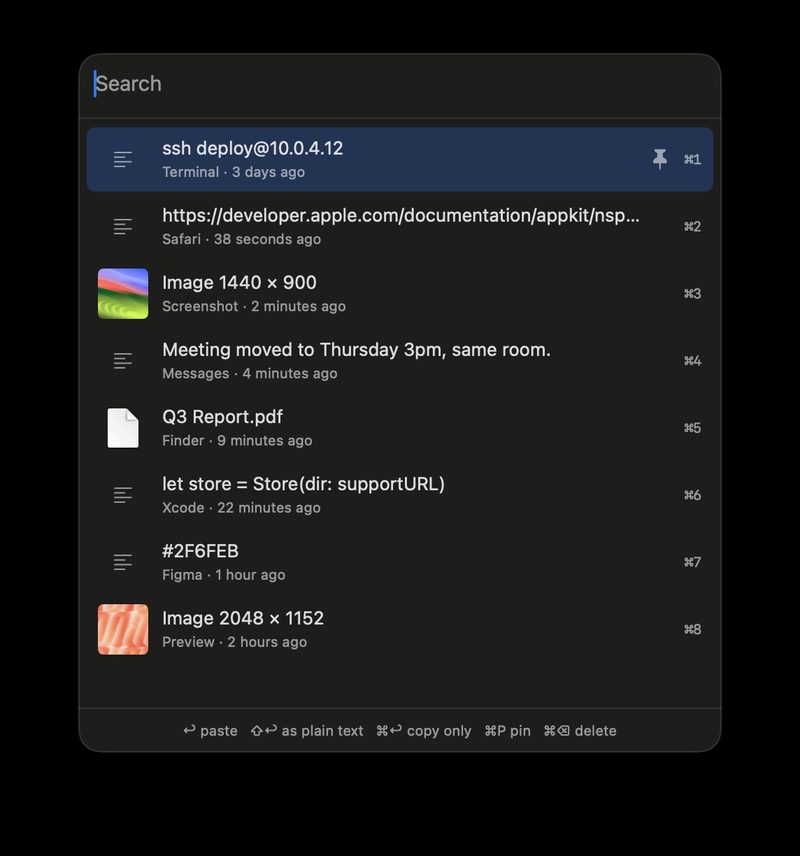
Remembers what you copy. Press ⌥⌘V and paste any of it back.
What it does
Copy things the way you normally do. Press ⌥⌘V anywhere and a panel opens at your cursor. Type to filter, pick with the arrow keys and press Enter. The item is pasted into the app you were in.
Text, images and files
Keeps text with its formatting, screenshots and images, and files copied in Finder.
Fast keys
⇧↩ pastes as plain text, ⌘1 to ⌘9 pastes one of the first nine items, ⌘P pins an item.
No duplicates
Copy something already in the history and it moves back to the top.
Skips passwords
Copies that password managers mark as concealed are never recorded. You can ignore any app too.
Stays on your Mac
History is a folder on your Mac: the last 500 items or 30 days by default. No sync, no telemetry.
Native Swift
No dependencies, no account. MIT licensed.
Free and open source
Magpie is free. The full source is on GitHub under the MIT license.
Get it on GitHub

